Security Planning for Commercial Property Common Areas
A practical common-area security plan for commercial property managers covering ownership, evidence objectives, privacy, access, handoffs and acceptance tests.
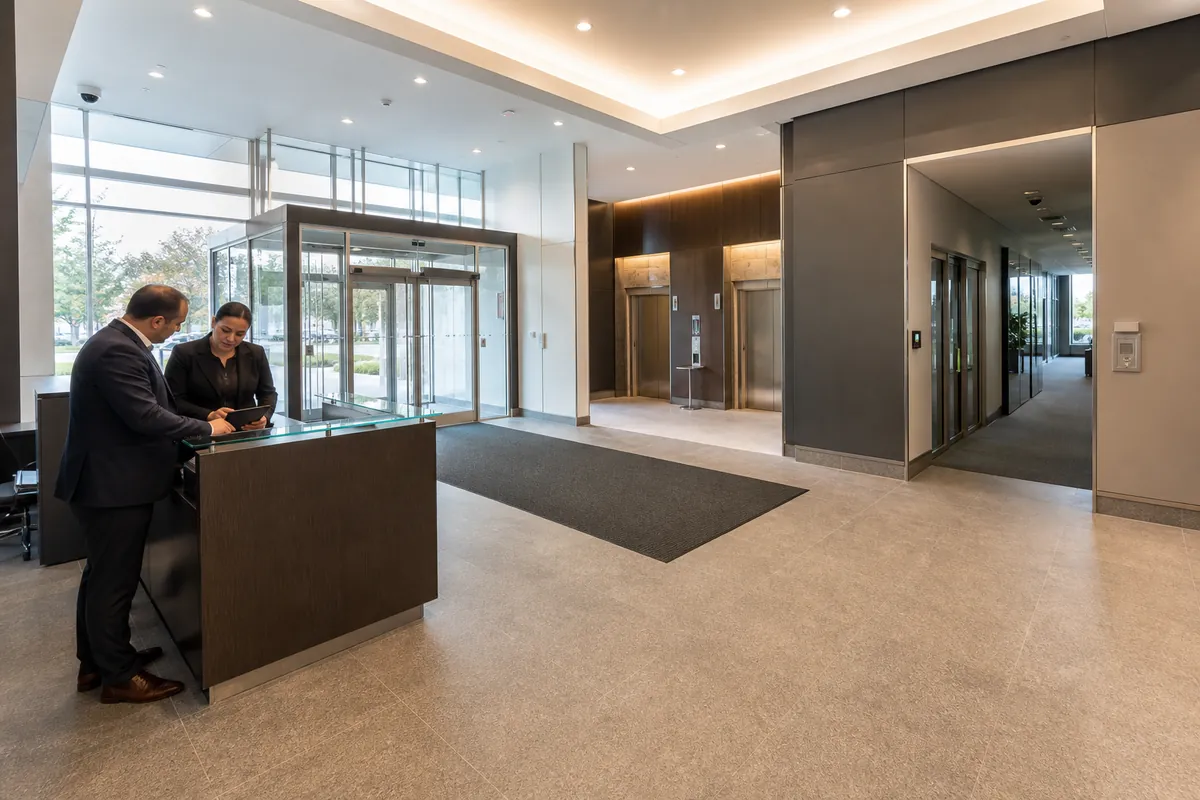
Commercial property managers often inherit a lobby camera, several controlled doors, an intercom and separate tenant systems. The real concern appears when an incident crosses those boundaries. One team controls the lobby, another controls the suite, a contractor manages the technology, and nobody can immediately say who should respond or preserve evidence.
The practical answer is a common-area responsibility and evidence plan. Divide the property into operational zones, give each zone a defined security objective, name the decision owner, and test the complete handoff between people and systems. This approach gives a property manager a defensible way to coordinate a commercial property security program across a broader commercial security system.
1. Define the boundary before selecting controls
A common area is any shared space managed for more than one occupant or visitor group. Its exact limits come from the lease structure, site rules, building operations and applicable legal responsibilities. A security drawing should show the operational boundary in plain language.
Start with a zone register that covers:
- the public approach, entrance and vestibule;
- the reception desk and waiting area;
- elevator lobbies, shared corridors and stairs;
- parking, bicycle storage and pedestrian connections;
- loading, courier and service routes;
- shared washrooms, fitness rooms, meeting rooms and other amenities;
- mechanical, electrical, telecommunications and security rooms;
- the threshold between the common area and each tenant suite; and
- emergency exits and routes through controlled openings.
For every boundary, record who owns the door, locking hardware, credential decision, visitor decision, camera, intercom, network connection, alarm response and service contract. Record who pays for a repair only after the operating responsibility is clear. A funding clause cannot tell a concierge whom to call at 9:30 p.m.
Use the lease and property rules as inputs, then have appropriate property, legal, fire, accessibility and privacy advisers resolve any ambiguity. The security plan should record the approved outcome without interpreting the lease on the fly.
2. Give each zone a specific evidence objective
“Camera coverage” is too vague for acceptance. A useful objective states what decision the evidence must support. Common objectives include detecting an event, verifying an alarm, observing activity, identifying an authorized user, reconstructing movement, confirming a visitor handoff or establishing the condition of a door.
Build a matrix before requesting equipment:
| Zone | Decision to support | Control or record | Accountable owner | Acceptance evidence |
|---|---|---|---|---|
| Main vestibule | Did a person enter during the event window? | Door status, time-synchronized video, intercom event | Property manager | Entry sequence can be retrieved by incident time |
| Reception handoff | Was the visitor approved and directed to the correct tenant? | Visitor record, host response, desk procedure | Building operations | Test visitor follows the approved path |
| Tenant threshold | Which credential decision occurred at the shared boundary? | Reader, door contact, access event | Named property or tenant owner | Grant, denial and held-door events are attributable |
| Shared corridor | What direction did a person travel after an event? | Purpose-limited overview video | Property manager | Movement can be reconstructed without excessive collection |
| Loading entrance | Was the service entry authorized and closed afterward? | Intercom, access event, door status, contextual video | Operations lead | Delivery scenario produces a complete event record |
| Amenity | Who approves access outside normal hours? | Schedule, credential group, booking or approval record | Amenity owner | Expired and out-of-schedule credentials are denied |
An evidence objective also defines limits. A corridor overview may support direction of travel while offering insufficient detail for identification. The entrance view can handle identification if that purpose is necessary and approved. Writing that distinction prevents every camera from being expected to perform every task.
Generic city crime rates provide little help with this matrix. Use the property’s incident, service-call, lost-credential, door-alarm and evidence-request records to set priorities. If the records are incomplete, state that limitation and begin collecting consistent site data.
3. Assign one accountable owner and a working responsibility schedule
One person or role should own the common-area security plan. That owner coordinates decisions while operational tasks remain distributed among property management, reception, security, tenants, cleaning, maintenance, IT, privacy, vendors and emergency contacts.
A practical responsibility schedule can use four labels:
- Accountable: approves the policy, risk decision or exception.
- Responsible: performs the task and records the result.
- Consulted: provides required expertise before the decision.
- Informed: receives the result, outage or incident notice.
Apply the schedule to real activities:
| Activity | Accountable | Responsible | Required handoff |
|---|---|---|---|
| Approve a new common-area camera purpose | Property privacy or business owner | Property manager | Purpose, view, notice, retention and access recorded |
| Admit a walk-in visitor | Building operations owner | Reception or security | Host approval and destination transferred to tenant |
| Disable a departing tenant credential | Property access owner | Authorized administrator | Tenant request validated and completion confirmed |
| Respond to a held common-area door | Operations owner | Security or on-call responder | Cause, action and unresolved defect recorded |
| Preserve incident video | Evidence process owner | Authorized investigator | Case number, time window, approval and custody recorded |
| Repair a failed reader or camera | Maintenance owner | Qualified service provider | Function retested by the business owner |
Include primary and backup contacts, business hours, after-hours escalation time and decision authority. Contractors need defined access and supervision. Tenant contacts need a renewal process because stale directories often fail during urgent events.
4. Design the lobby as a controlled handoff
The lobby connects public access, building operations and private tenant space. Its design should make the approved path easy to understand and give staff a clear line of sight to the entrance, waiting area and controlled threshold. ASIS International’s security-centric lobby guidance describes the importance of traffic flow, visitor management, access control and natural sightlines. It is practitioner guidance from 2020, so each property still needs its own risk, code and operating review.
Define separate workflows for:
- pre-registered visitors;
- walk-ins with an available host;
- walk-ins when the host does not respond;
- couriers and food deliveries;
- tradespeople requiring service-area access;
- tenant events with higher visitor volume;
- after-hours arrivals; and
- emergency responders.
For each workflow, specify who verifies identity when required, who approves entry, where the visitor waits, what access is granted, who escorts the visitor, when the authorization expires and what record is retained. A receptionist should have an approved backup decision path. Host silence should lead to a defined holding or refusal outcome.
Test traffic at the busiest expected period. A well-configured visitor process can still fail when the waiting line blocks the entrance, people bypass the desk, the intercom is inaudible or an accessible route becomes crowded.
5. Coordinate security with accessibility and life safety
Security devices change how people move through a building. Reader pedestals, turnstiles, desk extensions, queuing barriers and locked doors can affect accessible travel and emergency egress. Review these interfaces with qualified code, fire, accessibility and door-hardware professionals.
Ontario’s current overview of accessibility in the Building Code identifies barrier-free paths of travel, entrances, turning spaces, doorway and corridor widths, power door operators and other features for most new construction and extensive renovations. The page summarizes requirements and cannot replace a project-specific code review.
The Ontario Fire Code requires access to exits, including public corridors and outside areas, to be maintained free of obstructions. It also addresses exit and access-to-exit door hardware. Applicability depends on the building and occupancy. Security acceptance should therefore include the complete opening, its approved release behaviour and its interaction with relevant life-safety systems.
Test with representative users and operating conditions:
- approach and reach to the intercom, reader and door operator;
- manoeuvring space before and after the controlled opening;
- door timing for a person using a mobility device;
- visitor and delivery queues at peak volume;
- credential grant and denial without trapping a user;
- approved emergency release and restoration;
- alarm and door-state reporting during the release; and
- clear travel when temporary furniture or seasonal mats are present.
Record who is qualified to approve each result. A security installer can demonstrate configuration, while the authority responsible for code or accessibility compliance may require separate evidence.
6. Set privacy rules at the property level
Common-area video can capture tenants, employees, contractors, customers and members of the public. Establish the business purpose before choosing the view. The Office of the Privacy Commissioner of Canada’s guidelines for overt video surveillance in the private sector recommend considering less privacy-invasive alternatives, limiting viewing range, giving notice, restricting access, protecting recordings, documenting disclosures and destroying recordings when they are no longer required.
The guidance applies to overt surveillance of the public by private-sector organizations in publicly accessible areas. It excludes covert and employee surveillance, and it dates from 2008. Confirm current legal obligations for the organization, sector, activity and people being captured with qualified privacy or legal advisers.
Create a camera schedule containing:
- camera ID, location and accountable owner;
- approved purpose and evidence objective;
- exact field of view and privacy masks;
- operating, recording and monitoring status;
- audio and analytics status;
- signs and public contact information;
- authorized live-view, playback, export and administration roles;
- routine retention and incident-preservation rules;
- disclosure approval and transfer method; and
- review date and change triggers.
Tenant requests for common-area footage need a case workflow. Define how the requester is authenticated, who evaluates the request, how other people’s information is protected, how an export is approved and secured, and how the action is logged. Keep access roles narrow enough that a tenant can receive authorized evidence without receiving open-ended surveillance access.
7. Make access, video and intercom records tell one timeline
An investigation becomes faster when systems agree on time, door identity and event naming. Each shared threshold should use a consistent site name across the access-control platform, video system, alarm instructions, floor plans and service tickets.
Where products claim interoperability, verify the exact feature. ONVIF Profile T covers IP video capabilities including H.264 and H.265 streaming, imaging settings, metadata, motion and tampering events, with some functions conditional for conformant devices and clients. Conformance supports a defined interface. It leaves system design, cybersecurity, event correlation, retention and end-to-end acceptance to the project team.
Test the complete timeline:
- present an authorized credential;
- confirm the access event and door identity;
- open and close the door normally;
- retrieve the associated video by event time;
- compare recorder, access-control and operator timestamps;
- verify the person, direction and door condition needed for the objective;
- export the permitted evidence under a case number; and
- confirm the audit record identifies the requester, approver and operator.
Repeat with a denied credential, door held open, forced opening, intercom release and offline condition. A successful integration needs usable operator results under both normal and failure scenarios.
8. Build incident handoffs before an incident occurs
Create a short response card for each common-area event. It should tell the operator what to verify, when to dispatch, who to contact, what evidence to preserve and when to escalate.
For a held tenant-corridor door, the card might require:
- confirm the exact door and alarm duration;
- check the live view only if the approved purpose and role permit it;
- contact the assigned responder;
- record whether maintenance, tenant activity or unauthorized access caused the condition;
- preserve a defined time window when the incident criteria are met;
- create a defect ticket if the door fails to latch; and
- notify the tenant contact when the agreed threshold is reached.
Use a single incident identifier across the security log, video export, access report, maintenance ticket and tenant communication. Record time zones and clock offsets where systems differ. The final incident pack should be understandable to an authorized reviewer who was absent from the event.
9. Use scenario-based acceptance tests
Device status confirms only part of the outcome. A property manager should accept the system through scenarios tied to the evidence matrix.
Run at least these tests where relevant:
- Normal tenant arrival: valid credential, correct schedule, clean door close and retrievable event.
- Denied access: expired or wrong-group credential, clear user outcome and operator record.
- Visitor handoff: host approval, limited destination, expiry and return or checkout.
- Door held open: event threshold, operator notification, response and closure evidence.
- After-hours delivery: intercom call, approval, restricted route and door restoration.
- Video retrieval: a person unfamiliar with the installation finds the correct sequence from the incident time and zone.
- Privacy request: authorized staff locate, review and disclose or deny through the approved process.
- Network interruption: local security behaviour, queued events, health alarm and recovery are observed.
- Power interruption: approved backup, release and restoration behaviours are demonstrated.
- Peak lobby flow: waiting and screening remain workable while accessible and egress paths stay clear.
Each test record needs a test ID, precondition, action, expected result, observed result, evidence, tester, date, defect, owner and retest result. Treat configuration screenshots as supporting evidence. The operational outcome remains the acceptance target.
10. Ask vendors questions that reveal responsibility gaps
Use procurement questions that force a complete operating answer:
- Which common-area zone and evidence objective does each proposed control support?
- Who owns each visitor, credential, alarm, privacy and maintenance decision?
- Which lease, property or tenant assumptions influenced the design?
- How will the design preserve approved accessible paths and life-safety behaviour?
- What field of view will each camera use, and which adjacent areas will it exclude?
- Who can view live video, retrieve footage, export evidence and administer the system?
- How are access, video, intercom and alarm clocks synchronized and checked?
- Which claimed integrations use a standard profile, a vendor connector or custom work?
- What happens during lost network service, lost power, server failure and expired credentials?
- Which scenarios will be demonstrated before acceptance, and who closes defects?
- What property records, drawings, credentials, configurations and training materials are delivered at handover?
- How will tenant changes, renovations and new amenities trigger a design review?
The strongest common-area plan gives every shared space a purpose, owner, operator and proof standard. Securitron Canada can help commercial property teams turn that plan into coordinated access control, video, intercom, alarm and response workflows with clear acceptance evidence.
Frequently Asked Questions
The property manager should name one accountable building owner for the lobby security process, then assign operating tasks to reception, security, vendors and tenant contacts. The responsibility schedule should cover approval, response, evidence preservation, privacy requests and system maintenance.
Place cameras only after defining the event and evidence needed at each zone. Entrance approaches, visitor handoffs and controlled thresholds may need different views. Limit each field of view, protect sensitive areas and verify image usefulness under representative lighting and movement.
Access should follow a documented role and case process. Define who may view live video, request playback, approve an export and receive a disclosure. Protect other people captured in the footage and involve privacy or legal advisers where the request requires interpretation.
Run scenario-based acceptance tests across the full workflow. Test visitor approval, denied access, a held door, an after-hours alarm, video retrieval, incident escalation, privacy masking, power or network loss and restoration. Record the expected result, observed result, evidence and defect owner.